Beta 8.0.15
🚀 Key updates
General updates:
🌡 MBO Bundle is now available in Heatmap (Beta)
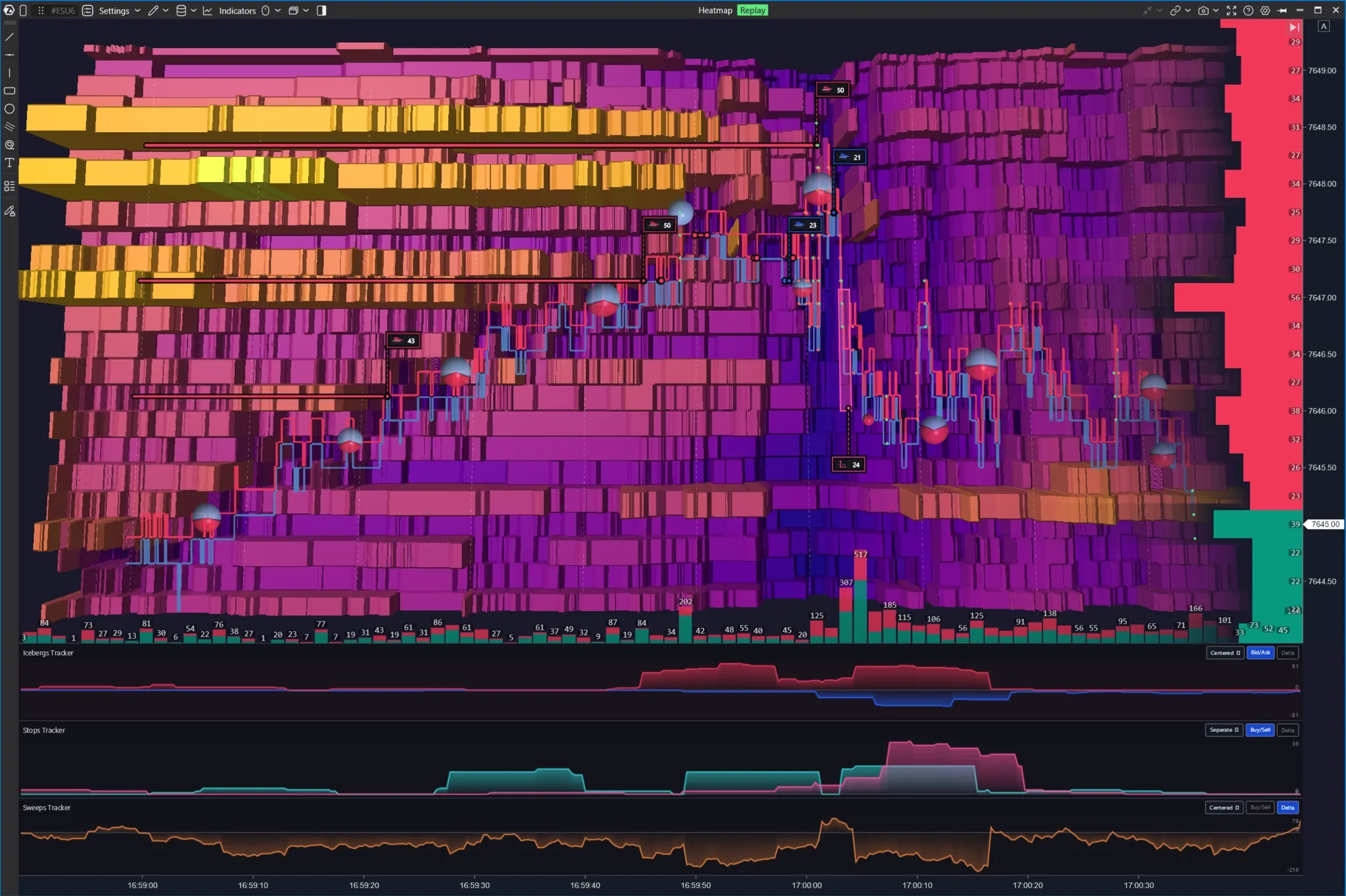
Icebergs Tracker, Stops Tracker, and Sweeps Tracker can now be used directly on top of the liquidity map. You now have access to more context on what is driving price action!
Trades that triggered stop orders can also be highlighted in a distinct color within bubbles, making it easier to pinpoint key moments on the chart.
MBO data requires a connection to Rithmic.
👥 Overlay Mode: Multiple assets on a single chart
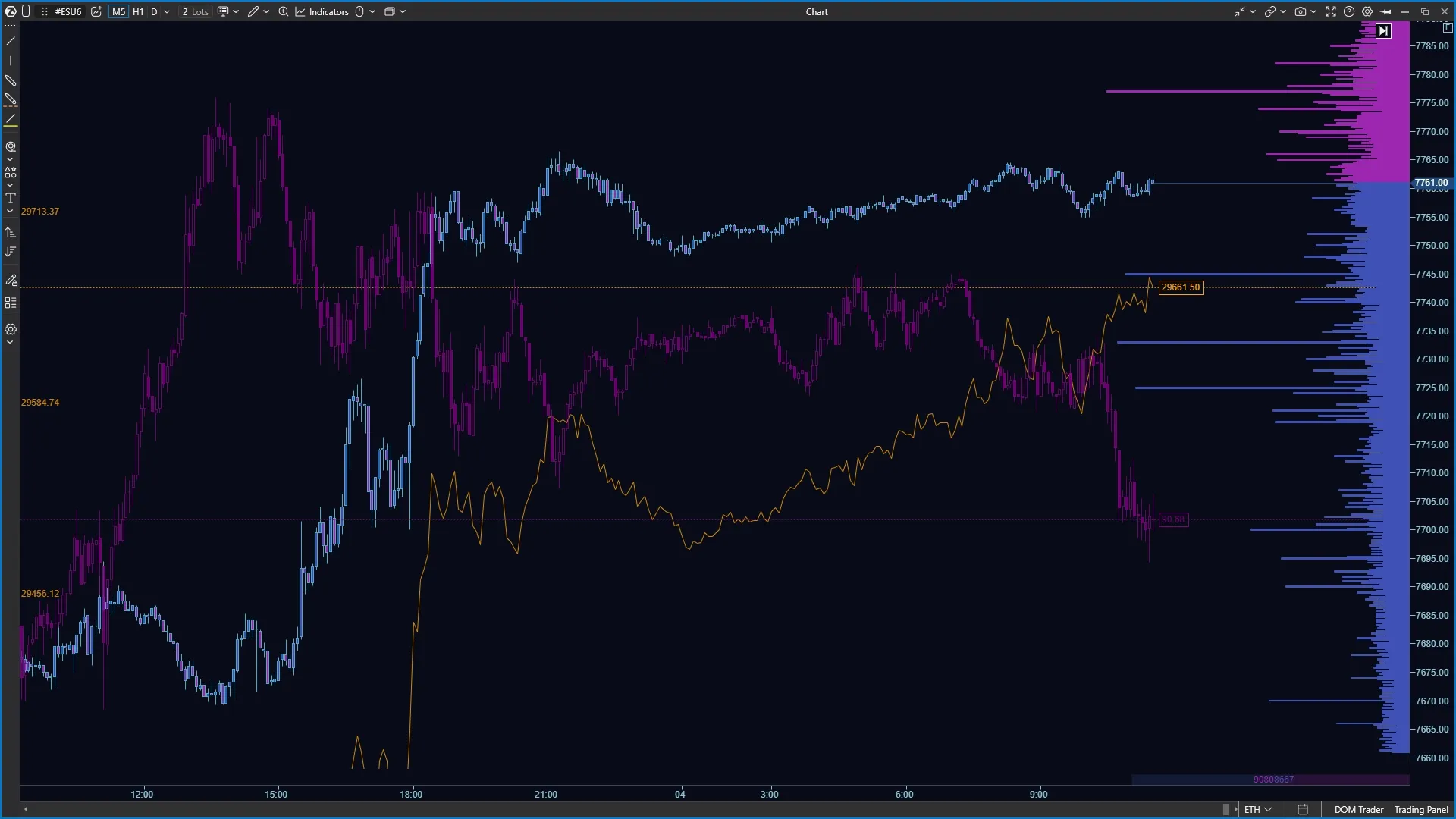
Compare the movement of multiple instruments on a single chart and find intermarket relationships between them. For example, you can overlay the dynamics of the classic ES futures contract and a cryptocurrency to identify correlation or determine which instrument is leading the move.
For each additional instrument, you can customize the color, scale, transparency, and display of its own price scale — keeping the chart readable even with multiple overlays.
Note that indicators and manual order management remain available only for the primary instrument.
🔐 Risk Management Module
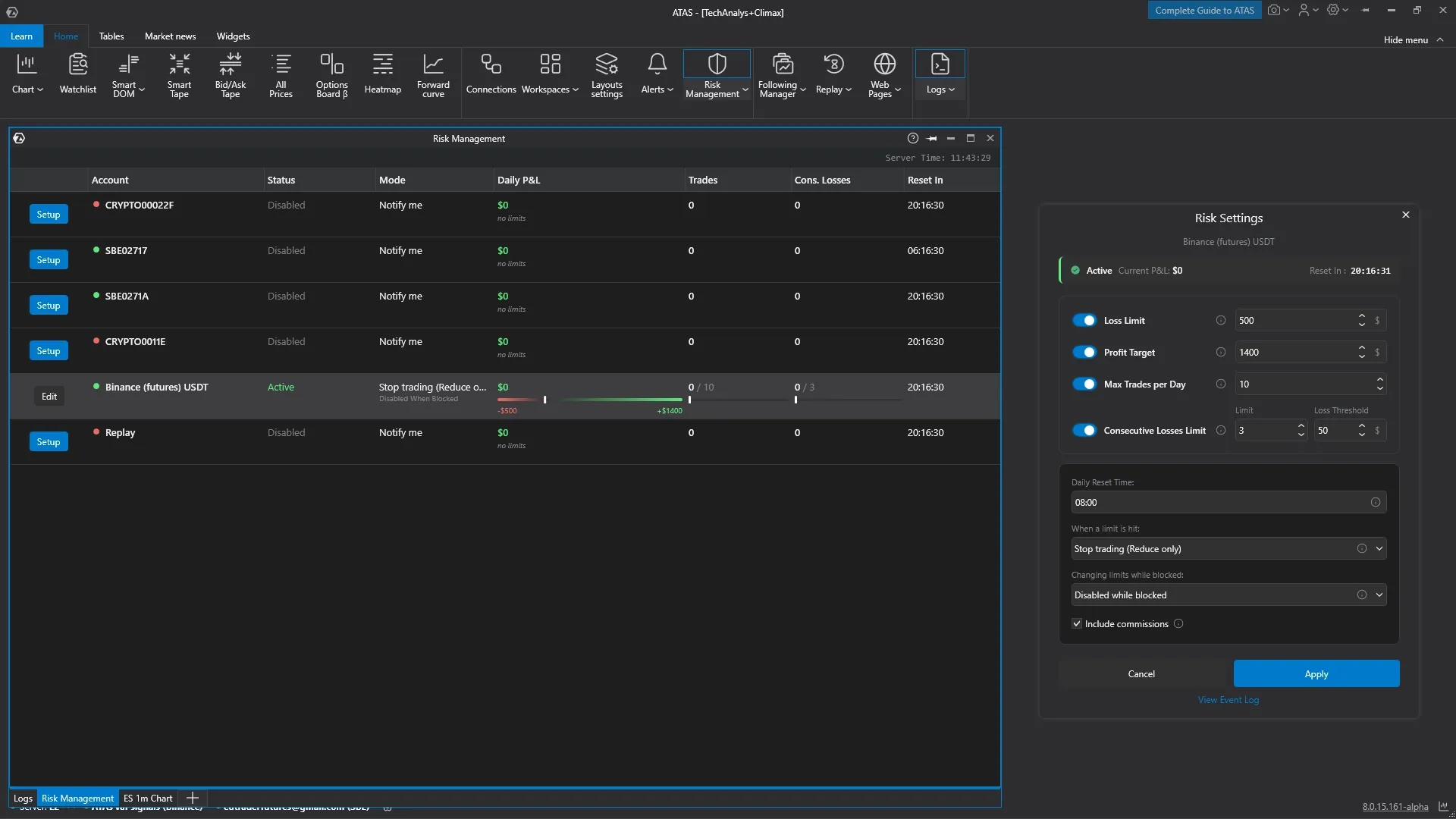
A built-in risk control system is now available!
For each account, you can define daily loss and profit limits, maximum number of trades, and the allowable maximum consecutive losing trades.
You can set up notifications when a limit is reached or switch the account to Reduce Only mode, allowing only position reductions. Additional modes protect settings from impulsive disabling after a limit is triggered.
Limit values (drawdown, profit, etc.) are updated in real time, and established limits are automatically reset at the start of a new trading day.
ATAS Classic:
▶️ Reimagined Replay
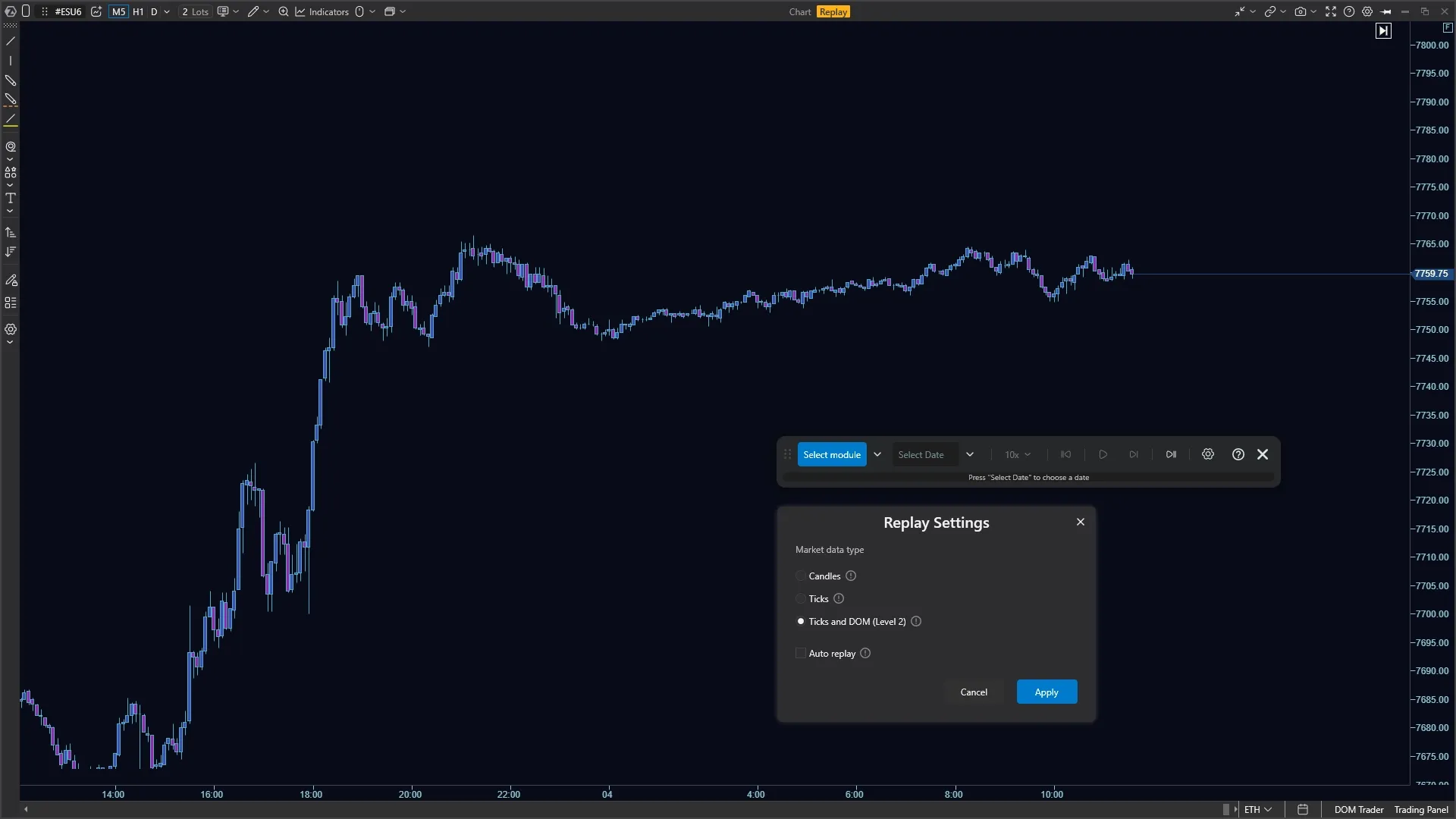
The trader simulator has received a new design. All settings and playback control buttons are consolidated into a single compact panel.
If you launch Replay for the first time and other modules are not open, you can select the required ones in the dialog box: Chart, Smart DOM, Smart Tape, or Heatmap. Then select the instrument for playback.
The control panel now looks like a narrow strip with standard playback buttons — it can be placed anywhere on the screen.
Directly from the panel, you can choose the desired module, playback mode (Bar, Period, or Date), and speed.
A progress bar is also located here, which can be used to navigate through the playback.
💻 Analytical Platform
General updates:
Added support for Single Stock Futures (SSFs from CME Group).
Instrument Manager:
instruments can now be searched not only by name, but also by ID — through connected connectors, even if the full tree of their instruments is not in the local catalog. The found contract is loaded into the standard tree and becomes available for opening in modules. For CQG, provider restrictions apply: search begins from the first character of the name;
modules can be loaded with instruments that are not in the ATAS instrument list;
if an instrument was unavailable for a while and then reappeared, linked drawings and shapes will not be lost;
removed text flickering when entering instrument names in the search box.
Module settings are now saved and synchronized instantly, without interface freezing.
Fixed the appearance of checkmarks (checkboxes) in settings.
Fixed opening the Workspace Editor from the main window.
Updated internal graphical interface libraries to make the analytical platform operate more smoothly.
Updated date picker calendar in chart timeframe settings:
• added quick selection of periods (Today, Last 7 Days, Last 30 Days, Last 3 Months, Last Year);• the calendar was expanded — you have 2 months visible at once for convenient period selection.
Improved the design of the "Go to Date" window, called via the button in the bottom chart menu.
Added fractional time zones for regions where local time differs from UTC by non-integer hours (15, 30, or 45 minutes).
Added interface translations for new languages: Italian, Japanese, Korean, Portuguese, and Hindi.
Connected a new screenshot service — you can still create screenshots directly from ATAS and get a ready-to-share link, no VPN required.
ATAS X (Beta):
Added prevention of duplicate launches — the analytical platform now always opens in a single window.
The analytical platform now remembers the last opened workspace and preselects it upon next login;
Optimized memory consumption during long sessions and accelerated application shutdown.
Authorization window:
added Workspace Editor in the authorization window;
logins containing an underscore "_" now display correctly.
ATAS Classic:
Authorization window:
the login window no longer resizes upon loading;
banner and login input field now display correctly;
Fixed crashes when opening workspaces without active connections or when experiencing connector lag.
Instrument Manager: fixed grouping crash on fast double-click.
Fixed window docking: removed sticking frames during dragging and unnecessary loading icons.
Layouts window can now be made more compact, and long names are neatly truncated.
🔥 Heatmap (Beta)
General updates:
Improved performance, memory consumption, and stability, including during high volatility and sharp volume spikes.
Added a dedicated hotkey settings section to toggle Heatmap and Best Price on/off.
Added mouse scrolling and a Fullscreen button. In fullscreen mode, primary actions remain available — screenshot creation, help, and settings — so you can fully analyze the Heatmap across the entire screen area.
The Heatmap automatically tracks the current price — shifting the visible range following the market so that active Bids and Asks do not move off-screen. This is especially useful during strong price moves, long sessions, and screen recording when manual re-centering is inconvenient.
Fixed an issue where Level 2 market depth was available but the heatmap failed to render it.
Reduced memory consumption when opening Heatmap while the historical file is still empty.
Eliminated crashes and application force-closes when calculating extremely large volumes.
Fixed a crash when loading workspaces with an active Heatmap — chart and instrument data now open correctly.
ATAS X (Beta):
Volume control hotkeys for Heatmap now work within the trading panel.
Fixed freezes and memory leaks when processing market depth (order book).
Fixed freezes and Vulkan renderer crashes on macOS when processing dxFeed data, as well as when opening Heatmap on Windows on ARM devices with Snapdragon processors.
ATAS Classic:
Screenshot, help, and settings buttons restored in fullscreen mode.
Aligned icons on the toolbar.
📈 Chart
General updates:
DOM Trader: Holding the stop orders key now works correctly regardless of mouse cursor position.
Footprint and templates:
added hotkeys for footprint modes: Volume, Trades, Bid/Ask, and Delta. Combinations are displayed directly in the selection menu and available in the general hotkey catalog. You can instantly compare cluster variations on the same chart area without navigating nested menus;
fixed the save and select template window for footprint charts;
preserved visual settings no longer disappear from the chart upon indicator or panel saving errors;
default template now applies taking into account all saved options.
Display and smoothness:
charts load faster: processing templates no longer slows down program launch;
fixed stuttering and chart rendering clipping when resizing windows on AMD graphics cards;
fixed trading session error after importing a workspace with Heatmap;
vertical offset now adapts correctly to high-resolution displays. Auto-recalculation occurs based on live candle extremes;
rendering errors no longer cause chart freezing.
Chart elements:
crosshair, trade markers, and labels remain visible on top of indicators;
added new option: candle countdown timer placed right next to the current price marker;
vertical grid can now be configured by bar or candle count. Set an N value — and a line will be drawn every N bars. On time charts, the interval automatically adapts to the chosen timeframe, keeping layout logical when switching timeframes;
removed scaling relative to the bottom level — chart control is now simpler and more predictable.
Fixed an error where upon opening an instrument for the first time, history loaded successfully, but candles appeared on the chart only after manual panning or scrolling.
ATAS X (Beta):
Optimized CPU load and memory usage on macOS during extended sessions.
Fixed visual setting errors when saving templates into custom user folders;
Context menu on the chart now opens instantly on right-click;
Chart elements:
fixed chart scaling via mouse scroll wheel;
corrected appearance and readability of the current price marker.
ATAS Classic:
Chart window no longer moves to another monitor after minimizing and restoring on multi-monitor setups with different DPI settings.
⚙️ Indicators
General updates:
Added Overlay Mode — open multiple instruments on a single chart simultaneously.
Added ability to add multiple instances of the same indicator on a chart in Indicator Manager. Convenient when needing several instances of Cluster Search, Big Trades, or other complex indicators differing by only one or two filters.
Built-in and custom indicators with identical names can now be used simultaneously.
MBO Bundle: optimized handling of extended MBO history — reduced chart and market data latency for Sweeps Tracker and Stop Runs Tracker.
Volume Profile: Fixed histogram display when "Left to Right" mode is turned off.
Big Trades: Restored option to view all trades without mandatory automatic filter raising. Data display completeness can be chosen even on liquid instruments — note that this may impact performance. Local cache clearance may be required after updating to fetch full history.
Bar Timer: Indicator settings allow positioning next to current price marker — remaining time until bar close stays constantly visible.
Imbalance Ratio:
• redesigned numerical value display — text maintains readability and behaves predictably when zooming in, zooming out, and vertically compressing the chart;
• settings and display algorithms fully aligned with footprint; added new parameters.
Delta Divergence: Displays clear N/A status if Big Trades history is insufficient for calculations.
OHLC Plus: Fixed profile levels now match chart scale accurately.
DOM Levels: Fixed history synchronization and correct accumulated depth playback.
TPO: Fixed calculation error when merging profiles.
BigTrades: Fixed highlighting of level ranges in footprint.
Maximum Levels: Indicator now operates correctly in Replay simulation mode.
Daily Lines: Half-gap level can be enabled again, with customizable line and text using familiar indicator logic without workarounds.
Indicators continue functioning even if online services are temporarily unavailable.
Added clear warning if an indicator file is locked by another program during import.
Added indicator panel transparency. Indicators in separate bottom panels can now be visually overlaid onto the price chart using transparent backgrounds. This allows, for example, overlaying Cumulative Delta onto candles to compare indicator extremes directly with price structure without reducing chart working area. Chart remains movable and scalable.
ATAS X (Beta):
Tooltips for custom indicator parameters now display correctly.
ATAS Classic:
Added ability to rename indicators on the chart — useful when duplicating the same indicator to analyze different chart elements.
Optimized scrolling behavior in indicator settings.
📊 Smart DOM
General updates:
Added global drawing objects: horizontal line, ray, Highlight Y, Rectangle. Simply add an object to the chart, enable its Global property — and objects automatically transfer to the DOM. Smart DOM settings allow configuring line display above or below price to avoid obscuring numerical values.
Improved DOM stability when data is missing on one side of the order book — DOM no longer freezes or desynchronizes from the price scale. Resolved DOM freezes when processing extremely large volumes.
Fixed accidental Stop order placement when right-clicking on the Bid/Ask column.
Removed false error messages regarding best prices (
Wrong BestBid).
ATAS X (Beta):
Fixed manual volume entry.
🧮 SmartTape
General updates:
Reset button now completely clears trade history — tape settings remain untouched.
ATAS X (Beta):
Column width no longer resets when minimizing adjacent windows from fullscreen mode.
Adjusted proportions and auto-hiding behavior of the scrollbar.
🧮 Bid Ask Tape
General updates:
Reset button now completely clears trade history — tape settings remain untouched.
Accelerated tape updates in ATAS X (Beta). Data can be cleared via Ctrl+R hotkey or through the Reset menu — column settings are preserved.
✏️ Drawing Objects
General updates:
Object selection: Double-clicking on the intersection of a drawing object and an indicator now opens the settings of the exact object clicked.
Snapping: Drawing objects no longer shift unexpectedly when restoring a workspace after switching between unavailable and available instruments.
Horizontal line: Defined minimum text size to ensure labels remain readable.
Ruler: Fixed text alignment on labels, including when triggered via middle mouse button.
💸 Independent Order Management
General updates:
Trading Panel: Synchronization of account, volume, and other trading panel settings moved from separate modules into a single unified mechanism. This removes redundant logic between Chart, SmartDOM, and Heatmap, reduces desynchronization risk, and makes setting restoration from workspaces more predictable.
Cross-trading: Selected trading volume is now remembered separately for CFD, micro, and standard contracts. Switching between them restores the previously set value specifically for that contract. This speeds up workflow and reduces the risk of accidentally placing an order of incorrect size.
ATAS X (Beta):
Privacy: added a privacy mode toggle to the account table header.
Protection against accidental actions: Warning message about active trades and open orders displayed when closing ATAS X (Beta).
🛡 Exit Strategies (SL/TP)
General updates:
Fixed auto-strategy logic: prevented re-sending of already triggered stop-loss or take-profit orders.
Multiple SL/TP: improved handling of partial execution for stop and take-profit orders.
▶️ Replay
General updates:
Added cross-trading support — contract loads alongside data contract.
Added Open Interest data streaming.
Historical status always visible in chart header — whether opened in a tab or separate window. Retain context on whether analyzing loaded history or live market data.
Connection management automatically locks during active Replay to prevent errors.
Fixed freezing when clearing cache with replay active.
Fixed data issues for ETH/RTH Market Profiles.
ATAS X (Beta):
Added Replay module in standard view familiar to ATAS Classic users.
ATAS Classic:
Completely redesigned and modernized Replay module interface.
✅ Following Manager
General updates:
Copy ratio is now set as an integer. Appropriate notification appears when loading groups with old settings.
Fixed order and position copying for CQG followers.
Fixed handling of modified pending orders: modified orders executing immediately copy correctly to follower accounts.
ATAS X (Beta):
Fixed active tab reset when maximizing module to fullscreen.
📺 Widgets
ATAS X (Beta):
Copying or cloning a widget completely copies its group and preserves settings: timeframe, indicators, drawing objects.
Fixed row duplication and date/time formatting errors during copying.
Clicking widget elements no longer resets controls.
ATAS Classic:
Market Pressure: eliminated data latency and chart lag during high volatility.
🤖 API
General updates:
Updated documentation for creating custom indicators for Classic ATAS and ATAS X (Beta). Clarified recommended .NET and C# versions, configuration and library selection, cross-platform compatibility, and performance best practices.
🔗 Connectors
General updates:
Rithmic: Updated server list and improved validation of additional connection parameters.
IQFeed: Fixed ECN data processing and resolved errors during automatic reconnection.
CQG:
WebAPI updated to version 2.297;
added search for instruments missing from the ATAS instrument list;
fixed footprint display.
dxFeed:
fixed futures market depth data processing.
restored intraday history for CME crypto futures and fixed weekly candle grouping for weekend sessions;
resolved Unable to get the candles loading error and fixed daily price level displays.
Interactive Brokers:
added support for stock options;
added support for open interest;
fixed primary portfolio currency display.
Exante: Added ability to manually select account currency.
Binance: Optimized real-time quote processing when working with numerous instruments simultaneously.
NinjaTrader: Deleted accounts no longer appear in the list.
Program no longer freezes when enabling or disabling a connector if the trade server fails to respond.
ATAS X (Beta):
Added visual loading indicator in connector settings window.
Transaq: fixed balance display in Trading Panel.
ATAS Classic:
Connection settings window opens instantly, without interface lag.