Option to show/hide buy & sell labels in bids and asks DOM columns
Hey guys,
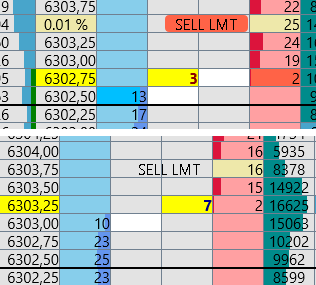
This may sound like useless feature hear me out please. These labels were added to DOM just recently. There is an option to change the color of the labels in the column settings directly in the “bids” or “asks” columns.
However, even though you change it to transparent, you can still see the text overlaps other columns to the left side now this is IMPORTANT whether the left column is price or current trades it can overlap important data just in that very second your mouse is over the limit button which can be a big deal if you are entering with mouse on limits. There should at least be an option to turn those labels off. I think its a simple and quick fix.
Thank you very much for anyone who can at least consider this!
Log in to comment and vote
Comments2
Andreas
Sep 23
•Merged request
•1 vote
Request: Option to Hide BUY/SELL Labels in DOM-Trader
Currently, the BUY and SELL labels in the DOM-Trader obscure the order flow indicator when hovering over the current bid or ask price. As a scalper, it's critical to hover over these price levels to enter positions while maintaining visibility of the most recently traded orders. The order flow indicator is strategically placed at the point of visual focus and provides essential real-time feedback.
Proposed Improvement:
Please add a setting in the DOM-Trader configuration to optionally hide the BUY and SELL labels. This would allow traders who rely heavily on order flow to maintain unobstructed visibility during trade execution, without sacrificing interface usability for others who prefer to keep the labels.
Andreas
Jun 7, 2025
The MODIFY labels of TP and SL also obscure the order flow indicator when hovering over the current bid or ask price.
Suggestion:
Add an option to hide the MODIFY labels of TP and SL as well.