Maximum Levels: Text should not overlap
When I use the indicator "Maximum Levels" for several periods, it can happen that two or more max. levels are at the same price.
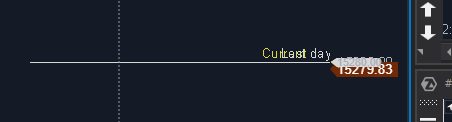
In the picture the max. level of the current day and the last day are identical and then the text overlaps.
Can you make the text not overlap but rather appear next to each other?
Log in to comment and vote
Comments5
Andrei Rinas
Sep 14, 2023
Unfortunately, indicators can't 'know' about others indicators and their labels. But we can add offset settings so you will be able to set offset and see all labels. Would it suit you?
Andrea
Sep 14, 2023
I attached a picture from another platform how I meant it could look like (however, I wouldn´t need the numbers).
Maybe we mean something similar? Just with the offset settings (in this example on the pic) the text Week would always be at this spot - no matter if Month and Contract are at the same price or not. Did I get it right?
If yes, would it be possible to change the text to abbreviate it so it doesn´t move too far in the chart?
At the end I think I would be fine with almost any solution that solves my problem :-)
Anonymous User
Sep 14, 2023
Yes, you got it right, ok, we will add offset and the ability to set own text instead of predefined
Andrei Rinas
Sep 15, 2023
Done, please expect it in next updates https://gyazo.com/23a9f88896f4ed4432d73d7ce98785ba
Gregor
Sep 15, 2023
1. Dynamic Offset Adjustment: To further enhance usability, I suggest implementing a dynamic offset adjustment feature. This means that when two or more labels would otherwise overlap due to coinciding price levels, the platform should automatically adjust their positions along the X and Y axes to prevent overlap. This ensures that labels remain readable and do not obstruct each other.
2. FONT SIZE: allow user to change the font size as currently there is no way on certain lines to do so, only the chart font can be done and the line / level font stays the same and too small in some cases.
Below is a picture of another platform that allows no overlapping. However it's nice to see that something is going to get done already