Improve Profile Line Thickness, Crosshair Display, and Key Level Label Customization
Hi, I would like to suggest several improvements to ATAS to make these tools easier to read and more practical to use.
1. Strike Profile and GEX Profile — Adjustable Line Thickness and Crosshair Display
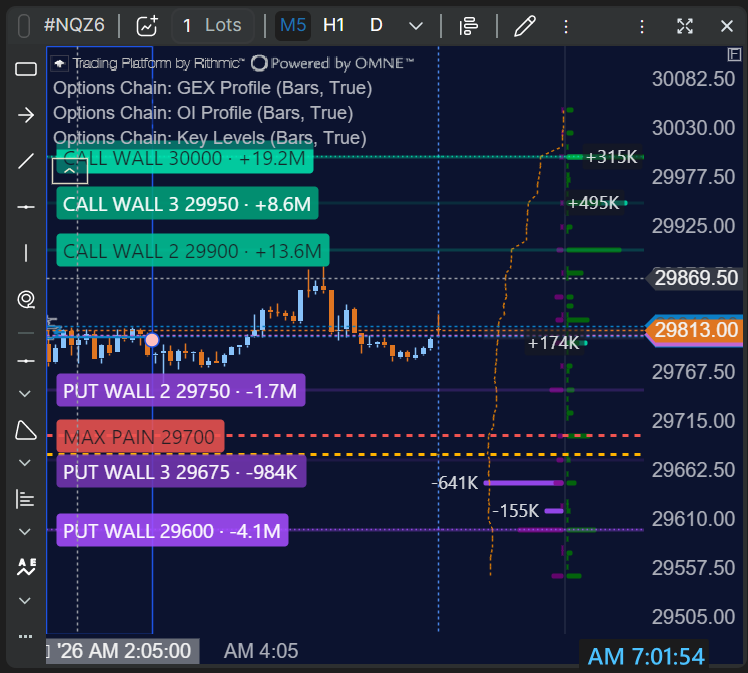
The lines in both the Strike Profile and GEX Profile are currently too thin, leaving too much empty space between the profile levels and making the profiles difficult to read clearly.
It would be very helpful to have an option to adjust the line thickness so users can make the profile bars thicker and easier to read.
Additionally, when the Layout setting is configured to Own Vertical Panel, the crosshair does not extend into the separate vertical panel where the profile is displayed. This makes it inconvenient to analyze profile levels in relation to price action.
Could you please consider extending the crosshair into the profile's vertical panel?
2. Option Chain Key Levels — Label Customization and Visibility
The labels for Option Chain Key Levels are currently too large. When I split the screen to view multiple charts in smaller windows, the labels take up too much space and can obscure a significant portion of the chart.
It would be very helpful to have options to customize:
Label size
Font size
Label content, allowing users to choose or edit the information displayed
If these customization options are not feasible, please consider adding an option to completely hide or disable the labels.
Currently, there is a Labels Position setting, but no option to turn the labels off entirely.
These improvements would significantly improve chart readability and usability, especially when working with multiple charts in smaller windows.
Thank you for considering these suggestions.
Log in to comment and vote
No comments yet
Be the first to share your thoughts.