Global Drawing Settings Management
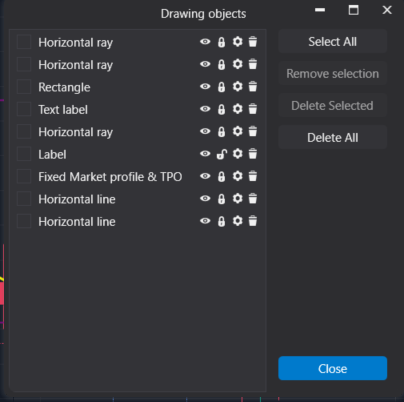
I would like to request an enhancement to improve the efficiency of managing drawing objects on the platform.
Currently, global settings for drawing objects must be enabled individually by selecting each drawing (e.g., trend lines, rays, channels) and navigating to its separate settings panel. This process is time-consuming and inefficient, especially when working with charts that contain many drawings.
I propose adding the ability to enable and manage global settings directly from the Drawing Objects window. This would allow users to:
View at a glance which drawing objects are set as global and which are not.
Enable or disable global settings for multiple drawing objects from a single interface.
Avoid manually checking each drawing one by one to ensure consistency.
Quickly identify if a drawing (such as a trend line) was accidentally not set to global.
This improvement would significantly streamline workflow, reduce errors, and save time when managing complex charts.
Thank you for considering this enhancement.
Log in to comment and vote
No comments yet
Be the first to share your thoughts.