Footprint proportion settings MUST have separate settings for both histogram scaling AND shading.
I'm having a major issue with the custom proportion setting in the footprint cluster settings.
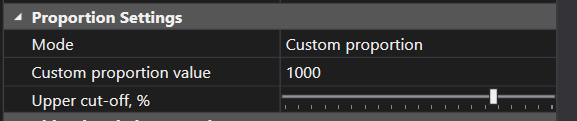
I generally like to use a custom proportion setting to have a fixed scaling value for the histograms on my footprint. The problem is that there is no way for me to do with this the color shading of the histogram. To make matters worse, ATAS is bugged and never displays the color shading properly when you first open up a chart with this setting turned on. The only way to have the shading display properly is to switch the mode to "Visible Region" then switch it back to "Custom Proportion". Whenever I load up ATAS, I have to manually go through all of my charts and do this odd workaround which will "reset" the color shading and allow it to display properly. The problem is that even after doing this this....the histogram shading still doesn't remain static and continues to scale itself as new bars and data print. The color shading needs to have it's own separate proportion settings so that we can dictate how both existing and new footprint histograms will shade and whether the shading can change or will remain fixed.
Log in to comment and vote
Comments2
Vanodga
Sep 8, 2023
Hi!
The issue you mentioned was fixed in the Beta version, as I can see, so you can check it. This place is only for new ideas, so I removed this information from post.
Danny
Sep 9, 2023
ah yes, drawing objects now stay locked in the latest beta...thank you!