Market profile and TPO drawing object - add the width option(how wide the profile should be drawn, relating to whole profile period)
In previous versions, the gradient option allowed us to compress the Volume Profile representation, so that it would not occupy the entire selected area.
When we select the Volume Profile drawing object (Range),
it allows us to select an area where we want to apply the Volume Profile.
This area has a start and an end.
Before in other versions, I think I remember it was with the Gradient option, the user had the possibility to select what % of the area should occupy the Volume Profile representation within that area.
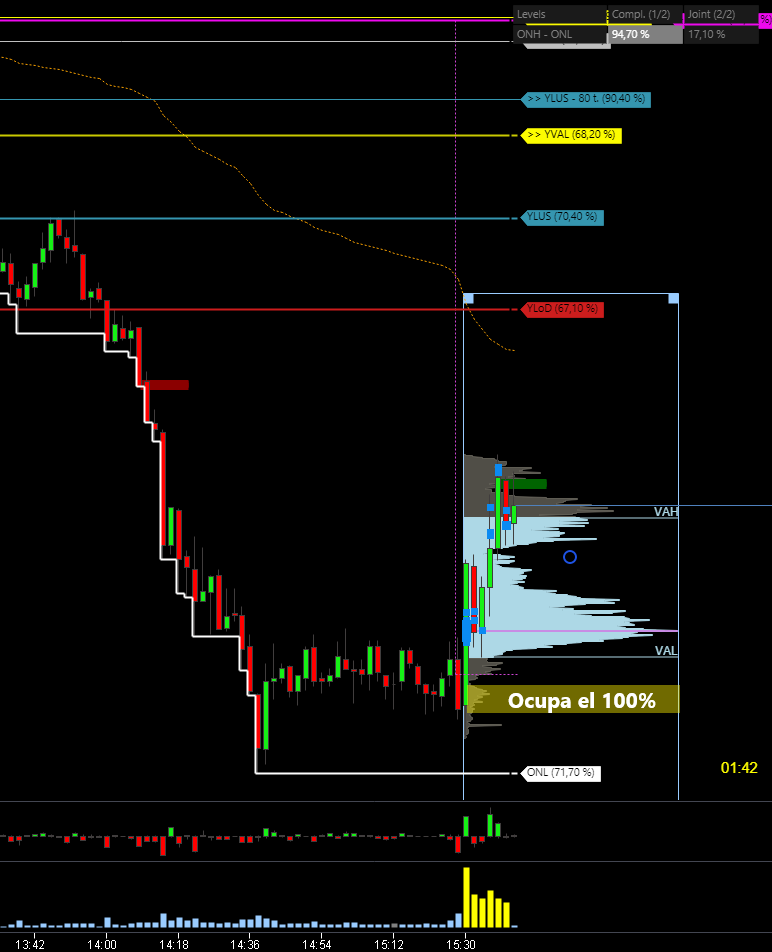
In order to have a cleaner selected area. Now, the volume porifle occupies 100% of the selected area, sometimes making it difficult to observe the sails in detail.
For example, if I selected gradient at 25%, when representing the volume profile, it only occupied 25% of the whole area.
I upload a photo as an example.
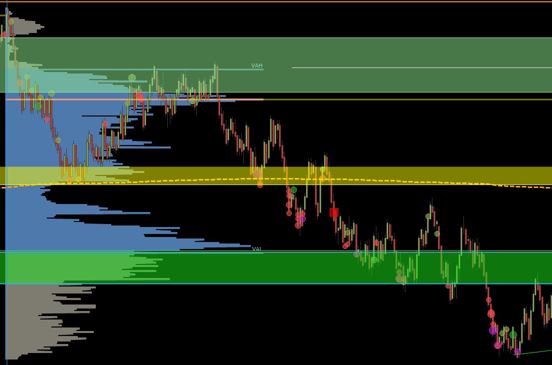
In the photo, the volume profile has selected all the area that can be seen, however the Volume Profile representation occupies only a part of the area, leaving the graphic cleaner and more comfortable for its correct reading.
It would be nice to have this option available again.
En versiones anteriores, la opción de degradado nos permitía comprimir la representación del Perfil de Volumen, para que no ocupara toda el área seleccionada.
Cuando seleccionamos el objeto de dibujo Perfil de Volumen (Rango),
nos permite seleccionar un área donde queremos aplicar el Perfil de Volumen.
Esta área tiene un inicio y un final.
Antes en otras versiones, creo recordar que era con la opción Gradiente, el usuario tenía la posibilidad de seleccionar qué % del área debía ocupar la representación del Perfil de Volumen dentro de esa área.
Con el fin de tener más limpia el área seleccionada. Ahora, el perfil de volumen ocupa el 100% del área seleccionada, dificultando a veces la observación detallada de las velas.
Por ejemplo, si seleccionaba degradado al 25%, la representación del Perfil de Volumen sólo ocupaba el 25% de toda el área.
Subo una foto como ejemplo.
En la 1ª foto, el perfil de volumen se dibuja sobre todo el área, ocupando el 100%.
En la 2, tiene seleccionada toda el área que se puede ver en la foto, sin embargo la representación del Perfil de Volumen ocupa sólo una parte del área, quedando el gráfico más limpio y cómodo para su correcta lectura.
Log in to comment and vote
No comments yet
Be the first to share your thoughts.