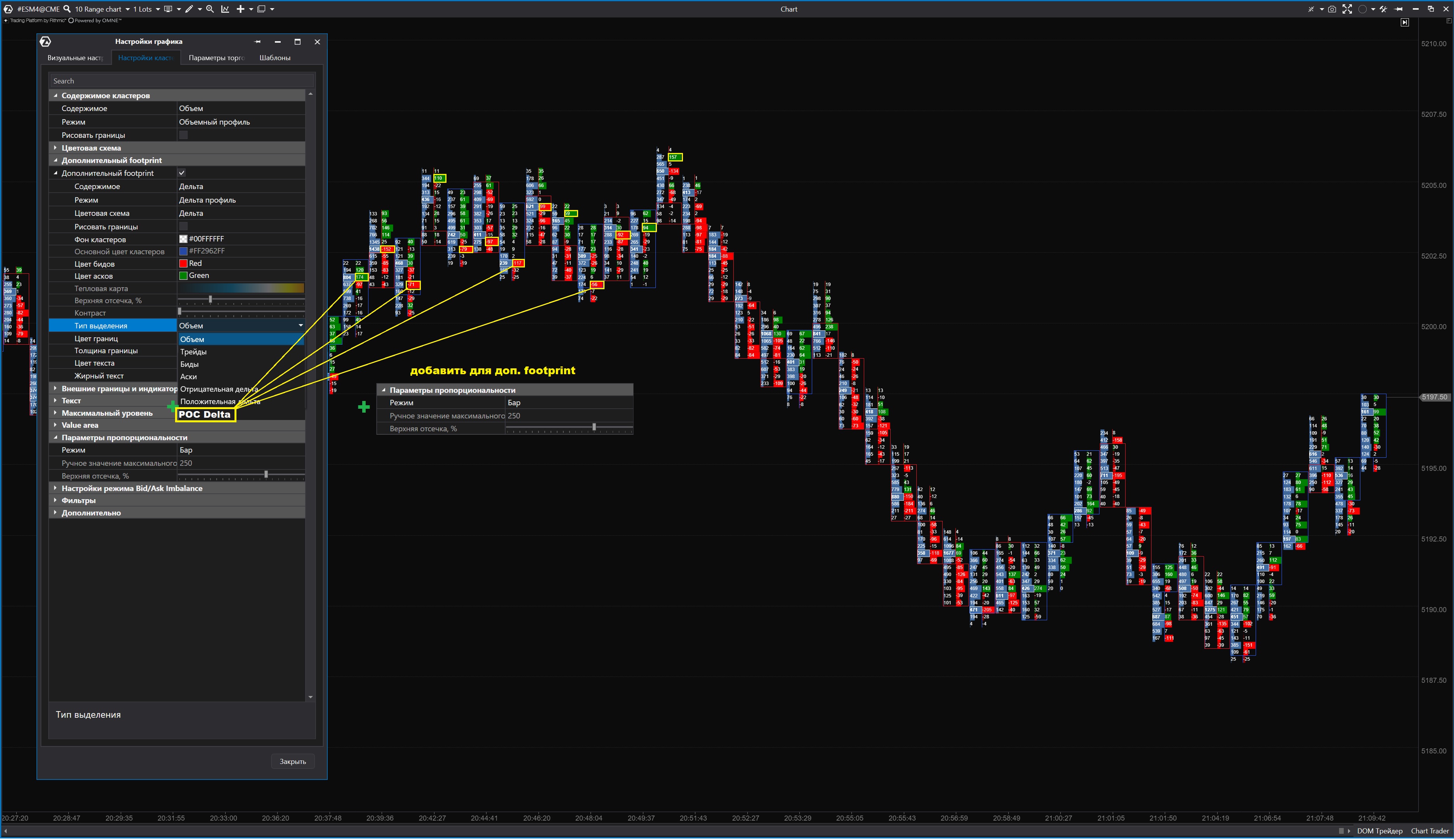
С функцией "дополнительный Footprint" команда АТАСа намного улучшила отображение и информативность Footprint.
я хотел бы внести два дополнения в настройки "дополнительный Footprint":
1. внести в настройки "Тип выделения" дополнительно "POC Delta".
На данный момент можно выделять только или положительную или отрицательную дельту
(хотя если бы можно было и положительную и отрицательную вместе выделять, было бы тоже не плохо)
2. внести в "дополнительный Footprint" настройки "параметры пропорциональности"
Так как на данный момент приходится в настройках "параметры пропорциональности" ставить на "Бар",
в этом случае все свечи на графике визуально равны и во всех свечах хорошо видны и объёмы и дельта, но мы не видим на графике где же те самые значимые свечи;
если же поставить на "Видимый участок графика" или "Весь график" или "Своя пропорция",
то дополнительный Footprint как таковой теряет смысл, так как теряется визуально.
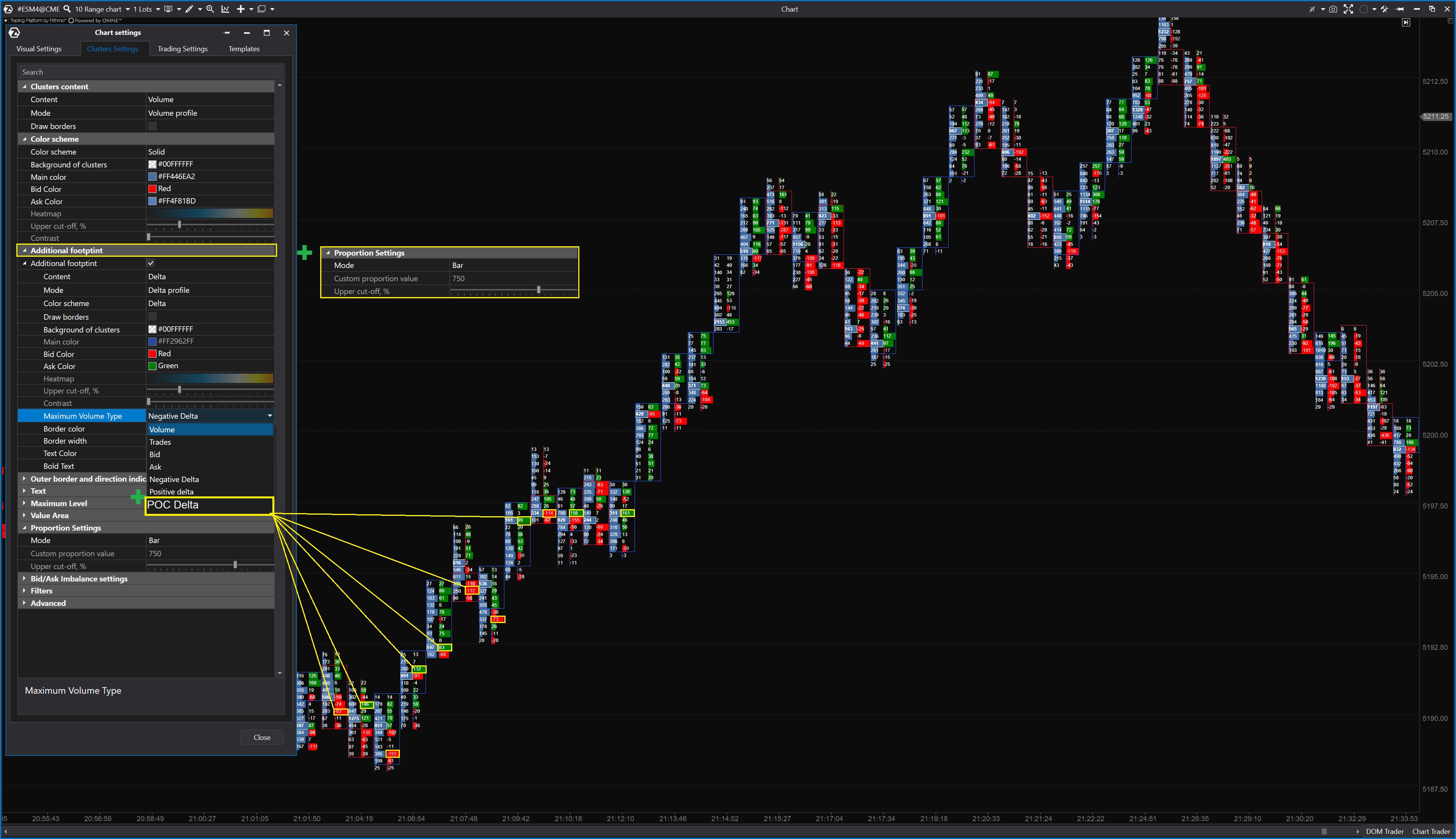
Мit der Funktion "Additional Footprint" hat das ATAS-Team die Darstellung und die Aussagekraft des Footprints deutlich verbessert.
Ich möchte zwei Ergänzungen zu den "Additional Footprint"-Einstellungen vornehmen:
1. Hinzufügen von "POC Delta" zu den "Maximum Volume Type" Einstellungen.
Derzeit kann man nur entweder das positive oder das negative Delta markieren.
(obwohl es auch gut wäre, wenn es möglich wäre, positives und negatives Delta zusammen auszuwählen).
2. Hinzufügen der "Proportion Settings" zu "Additional Footprint".
Denn im Moment müssen wir in den "Proportion Settings" Einstellungen "Bar" einstellen,
in diesem Fall alle Kerzen auf dem Chart visuell gleich sind und Volumen und Delta sind in allen Kerzen deutlich sichtbar, aber man kann nicht sofort zu erkennen wo liegen die Kerzen, die wirklich von Bedeutung sind;
wenn wir aber auf "Visible region" oder "Whole chart" oder "Custom proportion" einstellen,
verliert der "Additional Footprint" als solcher seine Bedeutung, da er visuell verloren geht.
With the "Additional Footprint" function, the ATAS team has significantly improved the display and informative value of the footprint.
I would like to make two additions to the "Additional Footprint" settings:
1. adding "POC Delta" to the "Maximum Volume Type" settings.
Currently you can only mark either the positive or the negative delta.
(although it would also be good if it were possible to select positive and negative delta together).
2. adding the "Proportion Settings" to "Additional Footprint".
For right now we need to set "Bar" in the "Proportion Settings" settings,
in this case all candles on the chart are visually equal and volume and delta are clearly visible in all candles, but you cannot immediately see where are the candles that really matter;
but if we set to "Visible region" or "Whole chart" or "Custom proportion",
the "Additional Footprint" as such loses its meaning as it is visually lost.