Add Custom Period in Histogram Profile column of Smart DOM
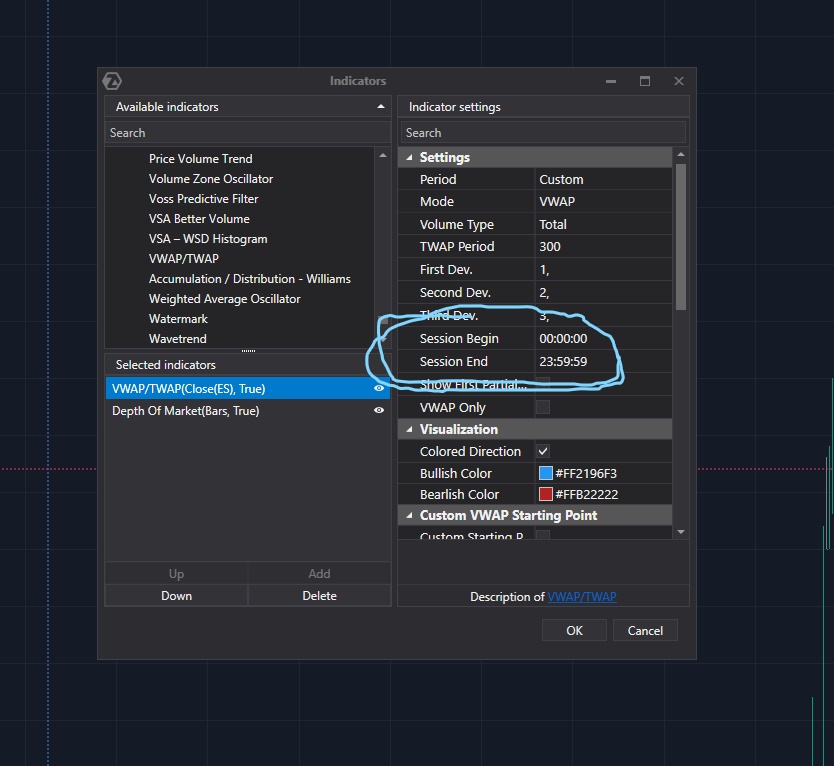
The fixed profile configured with a customized period has one major drawback.
We have to wait for the time we're interested in (open cash) and then set a profile for each chart and instrument.
This takes too much time for every open RTH every day.
My suggestion is to add the same settings as the vwap with the choice of a start and end time that resets every day for the Fixed Profile.
Adding the same option for the DOM profile would also be very useful.
Thanks
Log in to comment and vote
Comments10
Christoph
Oct 25, 2023
I also recommand this.
Oscar Torrecillas Lopezlopez
Apr 4, 2024
I need it too!! do it please ATAS
Vanodga
Aug 24, 2023
You can configure the Market profile and TPO with a custom period to show you the cash session.
Do you ask for the same possibility for a profile in Smart DOM? If so, please rewrite your idea for clarity. :)
Jean-Philippe
Aug 24, 2023
I've edited my post, I hope it's clearer.
Anonymous User
Feb 13, 2024
I also support this feature. Please add custom time option in the DOM. Thank you
Kalin
Sep 21, 2024
Please add this feature it would be a game-changer!!
Gaetan
May 28, 2025
This is a must do please!
Marco
Sep 23
•Merged request
•3 votes
Smart DOM Histogram Profile with custom intervals
It’d be nice to have custom intervals in the histogram profile on the smart dom, and, very important, the NY RTH session, as well as the EU session for those who trade on the Eurex. People asked for it more than a year ago. It’s essential.
Yan
Sep 23
•Merged request
•1 vote
customized DOM "Histogram profile" interval
I hope to be able to customized the interval of Smart Dom.
Currently, the shortest interval in setting is “current day”, which I assumed will start from midnight based on the exchange time? I hope to be able to choose a start and end time for Futures.
Tarik
Sep 23
•Merged request
•1 vote
Custom SMART DOM
It would be great to be able to customize Smart DOM information: Histogram, bid-ask, etc., all by session or time range.
I like to see that type of information separately. In the NY session, I don't want to see the information mixed with what happened in London or Pre-market.