21. Mai 2025
New
Fixed
Information
Version 7.0.9
⚡ Key updates in version 7.0.9 :
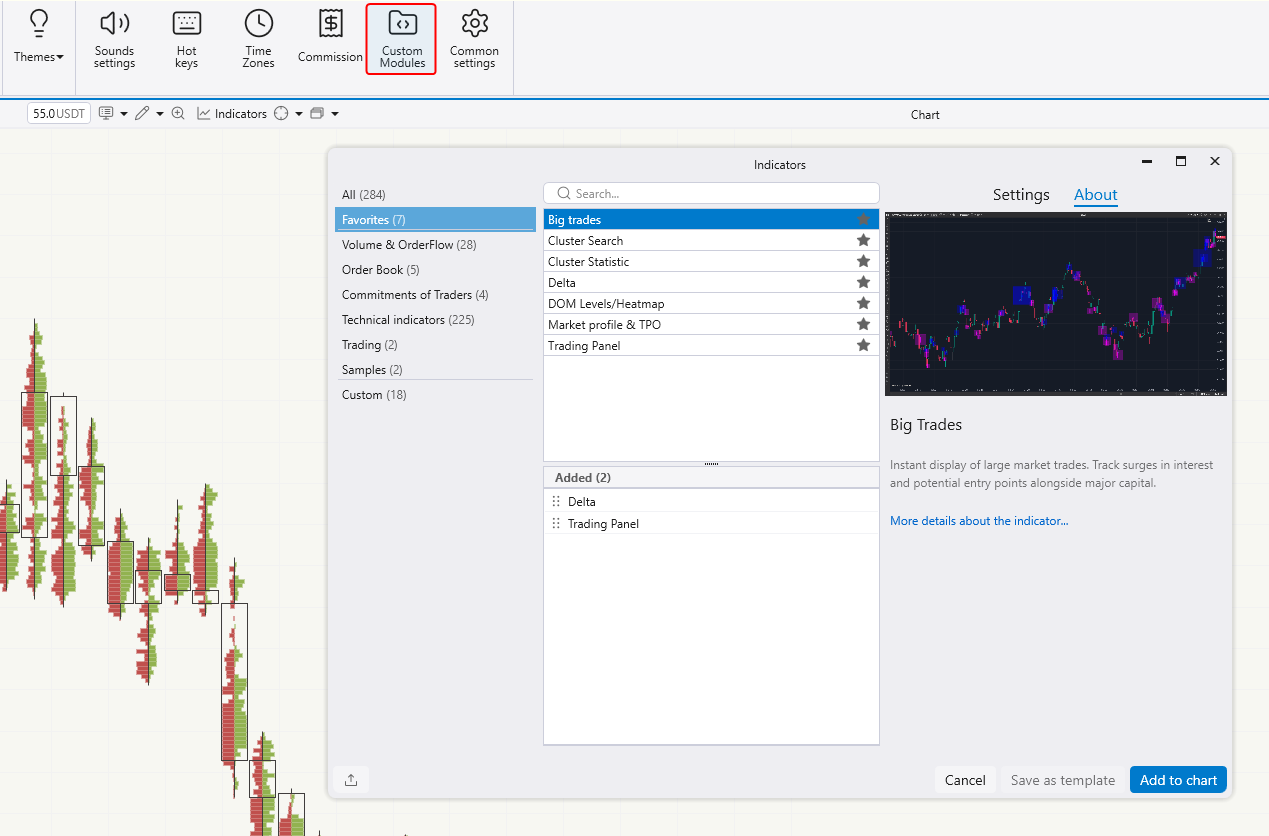
▪️ The indicator settings window has been made more informative and user-friendly. Indicators can now be added to favorites.
▪️ SmartDOM has been significantly upgraded in this version — see details below.
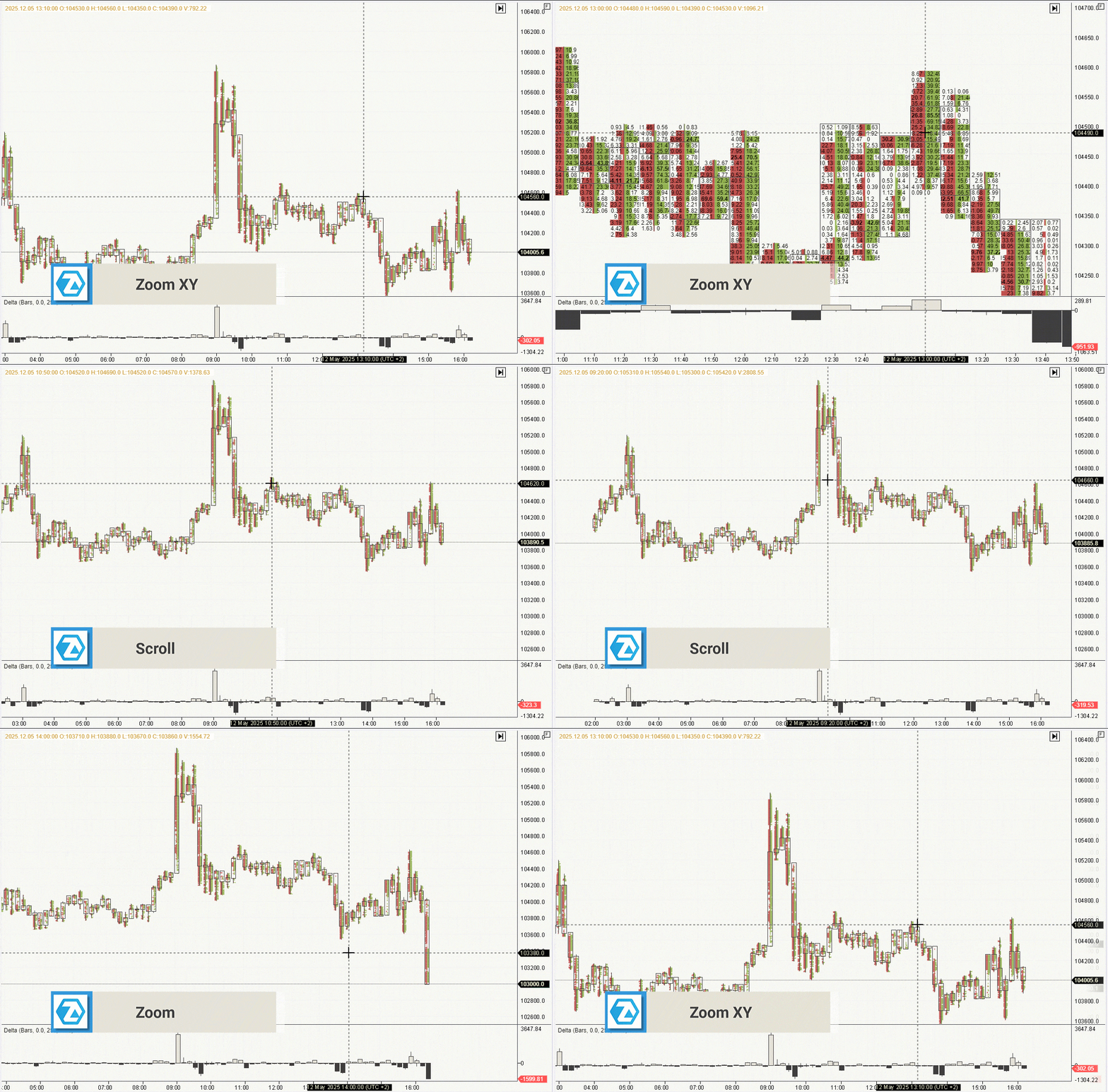
▪️ A new ZoomXY scrolling mode has been introduced, making it easier to switch from candle view to cluster view.
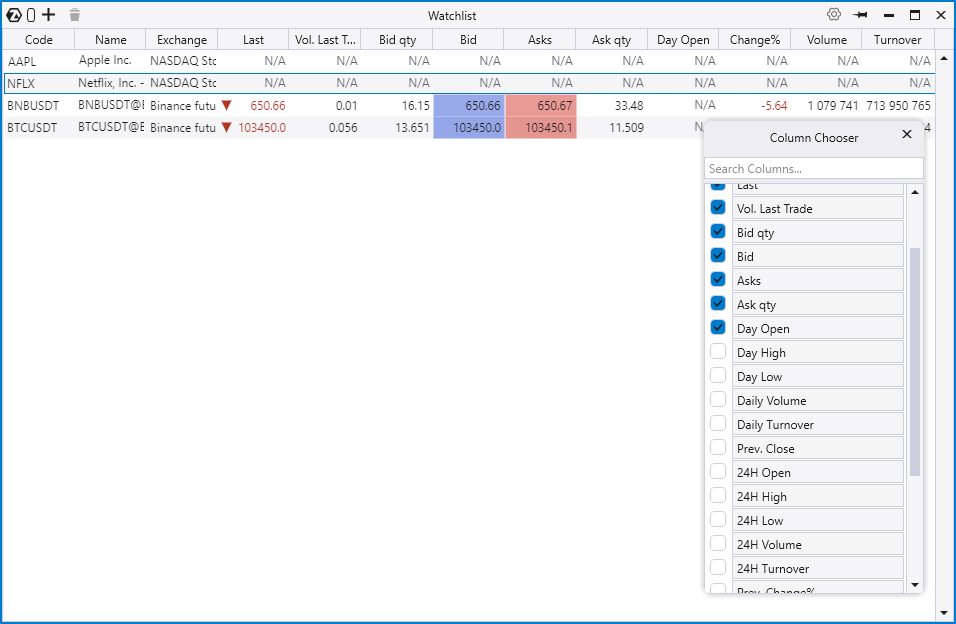
▪️ Turnover and % change columns have been added to the Watchlist module.
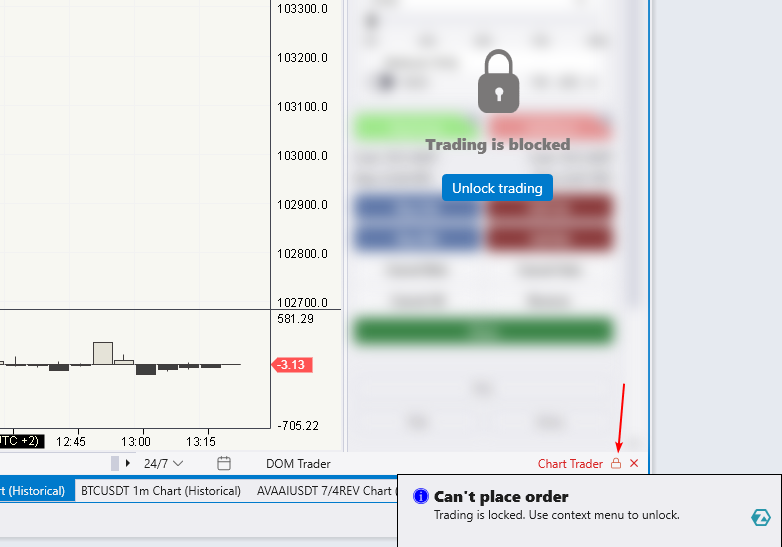
▪️ A clear Lock Trading status indicator has been implemented.
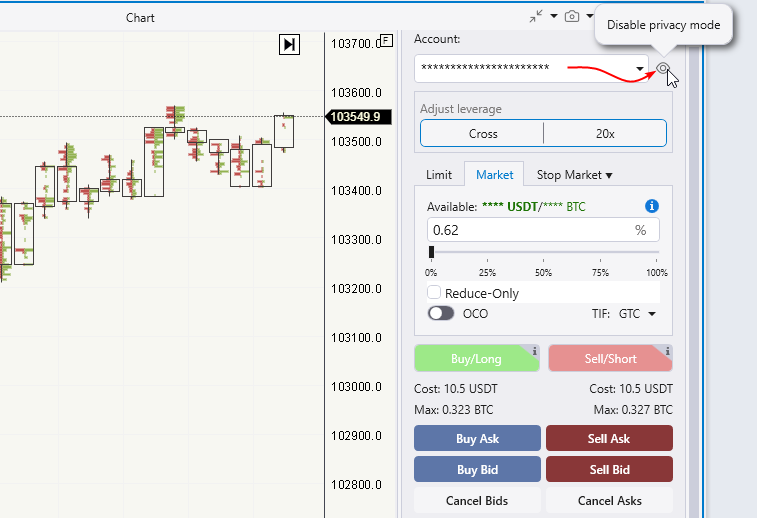
▪️ A private mode has been introduced: account name, balance, available funds, buying power, closed and open PnL, and commissions can now be hidden.
Please note that the changes introduced in version 7.0.9 are currently available in the Beta version only.
📈 Platform:
New instruments have been added: Ether Futures (ETH), Micro Ether Futures (MET), Yield Futures (2YY, 5YY, 10Y, 30Y), 1-Ounce Gold Futures (1OZ).
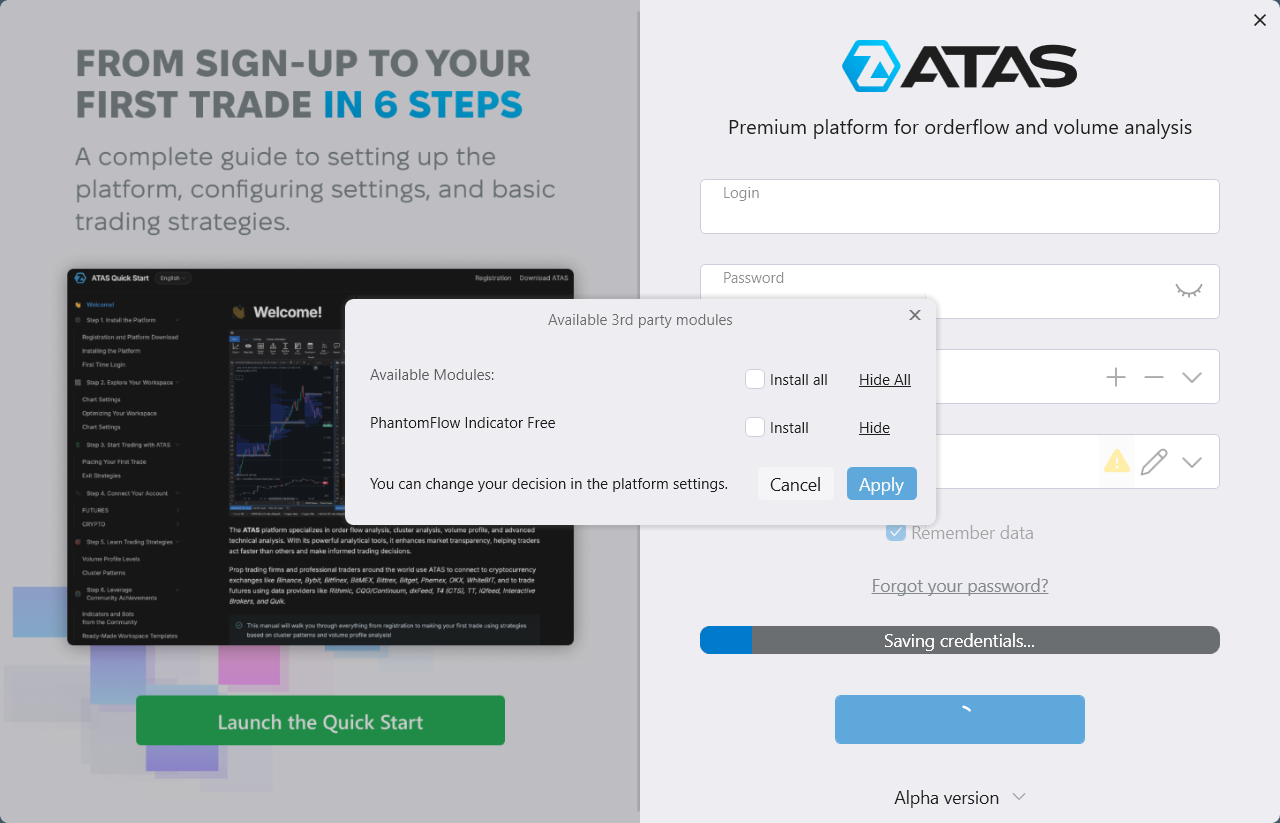
A dialog window for managing the loading of custom modules has been added.
Issues with updating the default scale for crypto instruments have been fixed.
PnL now shows 2 decimal places by default.
Debug logs are now automatically disabled when exiting the platform. An issue that occurred when closing the warning window about enabled debug logs has been fixed.
The “Learn” tab now closes automatically after applying the recommended template.
A bug affecting text fields when renaming or adding a new template has been resolved.
The banner in the login window now works correctly again — just click it to follow the link.
An Exit Wizard has been added, which appears the first time you exit the program after installing an update.
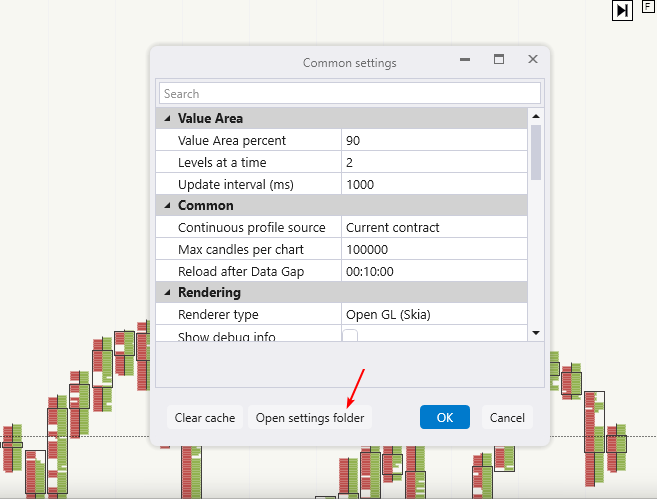
The settings folder has been moved from Documents\\ATAS to %APPDATA%\\ATAS. A button was added in the settings window to open the new directory. When transferring the settings, a backup is created and a shortcut to the new folder appears in Documents.
The platform version number is now clickable — it leads to the version history.
📊 Smart DOM:
Bid/Ask Ladder Column:
The new Avg Price setting displays the average price and shows an entry line when you open a position.
Order placement works like DOM Trader: left-click for Buy LMT, right-click for Sell LMT, and press V to switch to quick Buy STP and Sell STP placement mode.
Hints added to the Both limits column for clarity.
New Order Flow Column. Trade flow visualization using circles or squares, now with advanced volume filters and flexible display settings.
Price Column:
New background highlighting for the active position zone.
Ruler tool now shows the distance from cursor to current price in % or ticks.
PnL Column:
Limit orders outside the visible DOM area are now shown at the bottom of the column.
Added a one-click button to cancel all such orders.
You can now configure left-click behavior for placing order types directly in Bid/Ask column settings (previously in Common Settings).
Columns are now resizable via drag-and-drop, like standard table columns.
⚡ SmartTape:
SmartTape/BidAskTape: We have addressed the display issue that occurred when selecting a custom session on the chart.
📉 Indicators:
The indicator settings window is now more informative and user-friendly. Clicking an indicator shows a visualization sample and a description of its practical use.
Cluster Search: Charts with high volume now work stably.
Market Profile & TPO:
Single print lines now stop at the start of the next profile, instead of continuing through it;
Market Profile line markers remain visible when moving the chart.
Footprint Patterns: The construction of start and end lines at zero values has been corrected.
CVD: The indicator no longer disappears from the chart when stretched vertically.
Volume On the Chart: The candle and cluster display when loading old workspaces has been fixed.
Absorption: Issues with setting the color in the indicator settings have been resolved.
SuperTrend: The rendering of final trend lines has been improved.
CBI: The formula used to calculate RSI periods has been corrected.
VWAP:
Outdated and non-working TWAP Period properties have been removed;
A new 4-hour period has been added.
Open Interest: Candle rendering on small-height panels has been fixed.
Indicator settings window: Links to detailed articles now open according to the selected interface language.
Errors that occurred when using indicator templates have been resolved.
The issue with creating folders for indicator templates containing invalid characters has been fixed.
📊 Chart:
When Bid/Ask imbalance mode is enabled in an additional footprint, values no longer disappear — the issue with empty clusters has been fixed.
New scroll mode allows stretching the chart both horizontally and vertically simultaneously.
Volume Selector:
The min. volume restriction for the percentage tab in volume templates has been removed;
A bug related to changing the currency type in the compact mode of the chart panel has been fixed.
An issue with chart updates for time periods ending on the current day has been resolved.
A freeze that occurred when applying a chart template through the settings window has been fixed.
💸 Trading:
Chart Trader:
A visual indicator for the Lock Trading status has been added. The issue with saving lock trading settings via the context menu has been fixed;
A private mode has been introduced, allowing users to hide the account name, balance, available funds, buying power, closed and open PnL, and commissions.
Trading Panel: Separate settings have been added for Chase and Pullback orders.
An error message is now displayed if a Breakeven order is placed incorrectly using a hotkey.
Long/Short Position:
The cases where the price range would change when dragging the object on the chart have been fixed;
Incorrect SL and Entry price values for Long/Short positions have been fixed.
Trading Statistics: The issue with trade matching that led to a chain of incorrect statistical calculations has been resolved.
✏️ Drawing Objects:
Volume Profile Drawing Object: A dynamic POC line feature has been added.
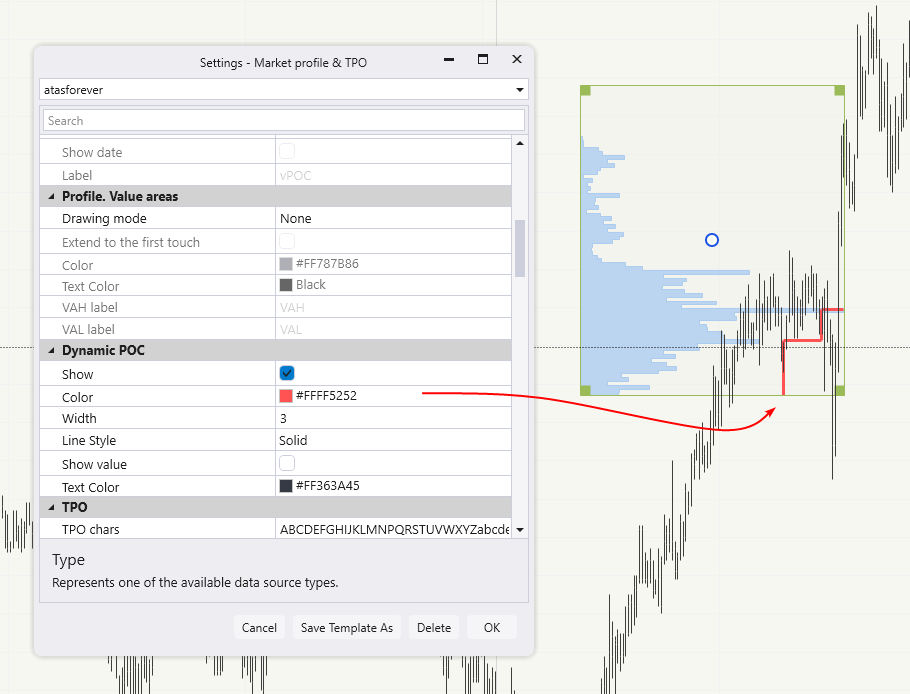
The improper behavior of drawing objects when changing settings has been corrected.
You can now add a horizontal price alert line via the chart’s context menu.
The issue with global drawing objects appearing on the indicator panel when using a template with the “Global” setting enabled has been resolved.
Ruler: The time range display on second-based timeframes has been fixed.
Daily Lines:
Lines are hidden when the user session is inactive;
The rendering of daily lines has been corrected when a custom time is set but has not yet been displayed on the current day’s chart.
Fibonacci Retracement:
The rendering of text markers in global mode has been fixed;
The graphical object has been renamed to "Fibo."
🔐 Exit Strategies (SL/TP):
Users can now manually set SL/TP levels for multi-level strategies.
The placement of exit orders is now handled correctly when a position is reopened after being closed.
SL/TP orders for MT5 now work correctly again.
📝 Watchlist:
New columns have been added: Daily data for futures and stocks, 24H data for crypto instruments.
🔁 Following Manager:
The processing of current orders and positions has been corrected for cases when a copy trading group is restarted.
🔗 Connectors:
Rithmic:
ThriveTrading servers have been added;
The issue with the connection of the extended connector has been fixed;
PnL is now calculated using best prices for maximum update speed;
Now it is possible to update the list of available servers without waiting for the release of a new version of the program.
dxFeed:
The code has been improved to enhance stability, reliability, and optimize the testing of enhancements;
Support for a list of instruments for multiple parallel dxFeed connections has been added;
The issue with loading daily charts when the maximum cluster depth was set has been fixed;
Real-time data processing by the server has been corrected;
A series of errors occurring during the reconnection of the connector has been fixed;
The calculation of the price step for securities has been corrected;
The error "Failed to parse working hour GLBX" appearing during connector connection has been resolved;
dxFeed delayed: The calculation of the progress of historical data processing has been fixed;
The issue with incorrect weekly chart construction when "AlignToSession" is enabled has been resolved;
The problem with missing DOM levels on EUREX instruments has been fixed;
The calculation of the MNK@CME schedule has been corrected;
The dxFeed API version has been updated from 2.5.1 to 2.7.0.
Transaq: The connector settings are now automatically updated when the password is changed.
Phemex: The processing of tick historical data has been fixed
OKX:
The display of open positions on the chart has been corrected;
The saving of Open Interest on the server and synchronization with the API has been fixed;
A series of deserialization errors occurring during the connector connection has been resolved.
Binance: The issue with the dialog window offering reconnection when settings were not changed has been fixed.
ByBit:
The issue allowing futures trading through a broker’s Whitelist account with futures trading enabled has been resolved;
A margin editing error has been fixed.
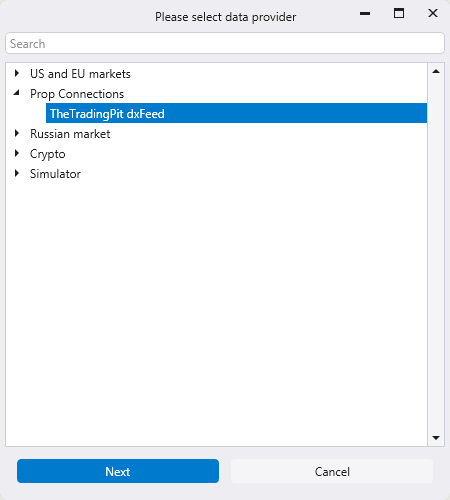
In the connection add window, Prop connectors are now grouped separately.
TheTradingPit: The data and trading connectors, "TheTradingPit DxFeed Data" and "TheTradingPit DxFeed Trading," have been merged into "TheTradingPit dxFeed" for easier management.
dxFeed Prop: A problem with incorrect PnL display in tick format has been resolved.
Trade OPM: The prop connector for connecting to Rithmic has been integrated.
FunderPro: The prop connector for connecting to dxFeed has been integrated.